
INCI Explained: How International Cosmetic Nomenclature Works (and How to Parse It)
Table of Contents
- Why the Same Ingredient Has Four Different Names Across Markets
- Anatomy of an INCI Name: Botanical Latin, Chemical Suffixes, and CI Numbers
- INCI vs. FDA, EU CosIng, Health Canada, and China NMPA: Where They Diverge
- Mapping INCI Data Onto Real Product Workflows: Three Use Cases
- Five INCI Parsing Mistakes That Silently Break Skincare Software
- Integration Checklist: Wiring INCI Data Into Your Product
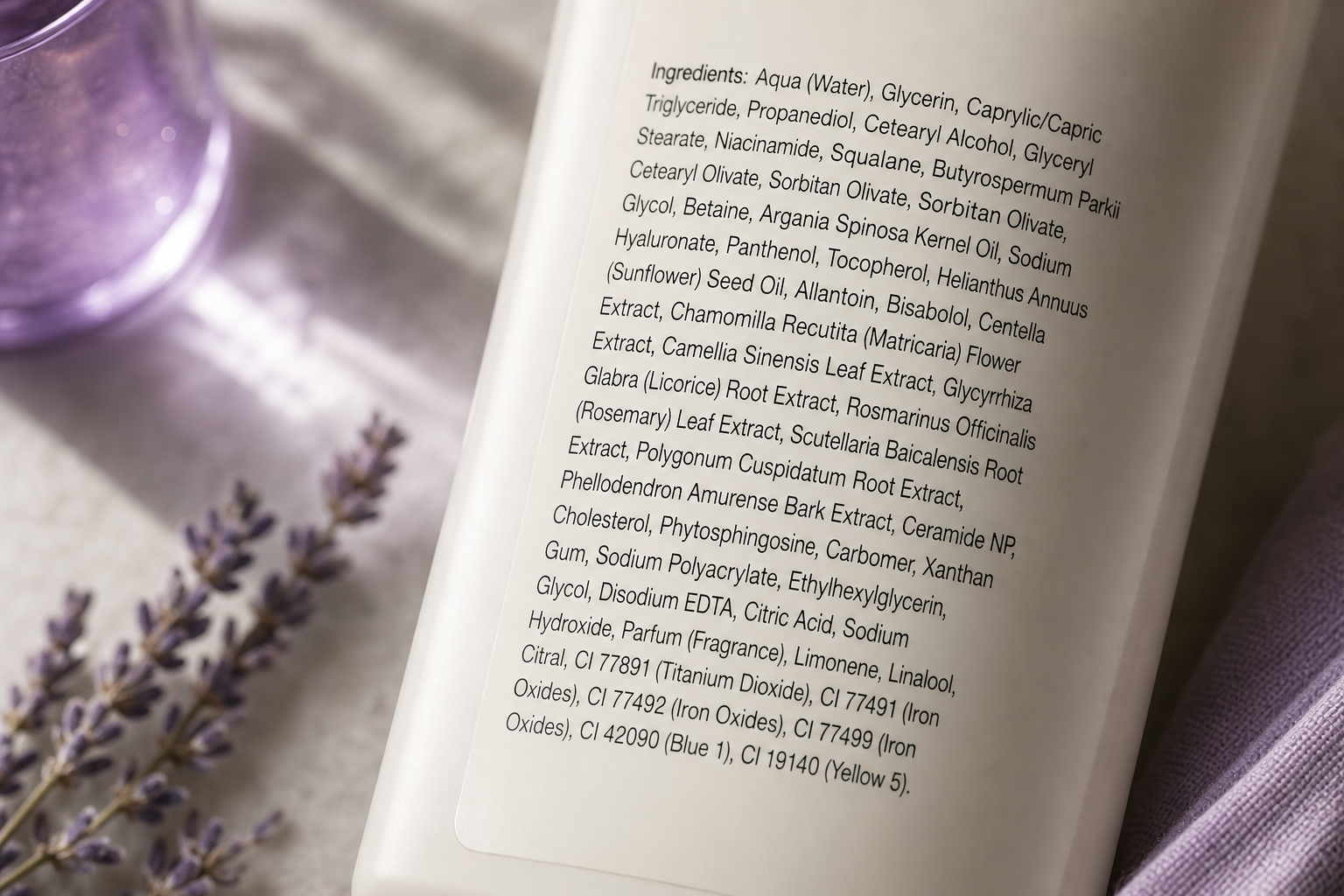
You're building an ingredient scanner. Your OCR pipeline extracts a string like "Aqua, Cetyl Alcohol, Sodium Chloride, Tocopherol, CI 19140, Parfum" from a moisturizer label. Your backend now has to answer three questions: which of these are problematic for sensitive skin, what does each one do functionally, and is the product even legal to ship to the EU. The label answers none of these. The names look standardized but aren't — Tocopherol in a US product may appear as Tocopheryl Acetate in the EU SKU of the same brand. The problem isn't the ingredients. It's the naming system. The international nomenclature of cosmetic ingredients — INCI — was designed to fix exactly this, but only if you know how to parse it.
Why the Same Ingredient Has Four Different Names Across Markets
A single chemical substance can appear under at least four distinct naming conventions on product labels sold internationally. The INCI (International Nomenclature of Cosmetic Ingredients) is maintained by the Personal Care Products Council (PCPC) and serves as the labeling standard across the EU, US, ASEAN, and most of the world. EU CosIng, the European Commission's cosmetic ingredient database, adopts INCI names but layers EU-specific restrictions and allergen flags. The FDA / US CFR Title 21 references INCI but also accepts USAN (United States Adopted Names) and USP/NF designations for actives — see CFR Title 21. China NMPA publishes the Inventory of Existing Cosmetic Ingredients in China (IECIC 2021), which uses INCI plus a mandatory Chinese-language equivalent and its own permitted-use list — see NMPA.
Three concrete examples make the divergence visible. Vitamin C: the marketing label says "Vitamin C," INCI says Ascorbic Acid (the L-isomer is L-Ascorbic Acid), but derivatives like Ascorbyl Glucoside, Sodium Ascorbyl Phosphate, and Tetrahexyldecyl Ascorbate are functionally similar but legally distinct ingredients with different CAS numbers and different stability profiles in formulation. Water: INCI is Aqua in EU labeling, Water in US labeling — the same molecule, two compliant labels, one canonical record. Vitamin E: appears as Tocopherol (the free alcohol) or Tocopheryl Acetate (the ester); they behave differently in formulation — the acetate is more stable against oxidation — but consumers and naive parsers conflate them as the same active.
The concrete failure modes show up in production code. Skincare app ingredient scanners return false negatives when OCR extracts Aqua but the local database is keyed on Water. E-commerce filtering ("show me fragrance-free products") fails because Parfum, Fragrance, Aroma, and 30+ specific essential-oil INCI names — including Citrus Aurantium Dulcis Peel Oil, Lavandula Angustifolia Flower Oil, and Mentha Piperita Oil — all map to the same consumer concept. DTC brands expanding into the EU discover their US-formulated product violates EU Annex II/III restrictions even though every individual ingredient passed FDA review. Backend SKU reconciliation between a US warehouse and EU warehouse fails because the same product carries two different ingredient lists in two different label languages. A fifth failure that bites recommendation engines: user-supplied allergen exclusions (a customer marks Methylparaben as a trigger) fail to suppress products labeled with Methyl 4-Hydroxybenzoate — the same molecule under its IUPAC chemical name. String matching alone produces match rates well below what production systems require, and that is why structured ingredient APIs index every synonym, CAS number, and EC number against a single canonical record.
INCI is the closest thing the industry has to a universal naming layer, but using it correctly requires understanding three things: how the names are constructed, how they diverge under regional regulators, and how to map them to structured data in your application. The international nomenclature of cosmetic ingredients gives you a vocabulary; the regulator gives you a verdict; your parser has to reconcile both. The next section breaks down the grammar of the names themselves.
An ingredient is the same molecule everywhere, but its name and its legal status change the moment it crosses a border. Without INCI as a reference layer, you are reconciling four rule books at once.
Anatomy of an INCI Name: Botanical Latin, Chemical Suffixes, and CI Numbers
Every INCI name follows one of three lexical patterns: a chemical name (e.g., Sodium Lauryl Sulfate), a Latin binomial for botanicals (e.g., Aloe Barbadensis Leaf Juice), or a Color Index reference for colorants (e.g., CI 77891). The label format itself encodes order, concentration tier, and blends through specific syntactic conventions defined by EU Regulation 1223/2009 Annex VII. Five decoding rules cover the parsing surface you will hit in production.

Step 1 — The Descending Weight Rule
Ingredients above 1% concentration must be listed in descending order by weight; ingredients at or below 1% may appear in any order. The regulatory basis is EU Regulation 1223/2009 Article 19(1)(g). In a label like Aqua, Glycerin, Niacinamide, Phenoxyethanol, Tocopherol, you can safely assert Aqua > Glycerin > Niacinamide by weight, but you cannot assume Phenoxyethanol > Tocopherol since both are likely below 1%. The developer implication is concrete: do not infer concentration ranking past the "1% line." That line is typically anchored near a known preservative such as Phenoxyethanol, capped at 1% under EU rules. Anything below it is unordered.
Step 2 — Botanical Latin Binomials
Plant-derived ingredients use Linnaean Latin binomials plus the plant part and the extraction form. Aloe Barbadensis Leaf Juice decomposes as species Aloe barbadensis, part = leaf, form = juice. Rosa Damascena Flower Oil follows the same genus-species-part-form pattern: rose species, flower part, oil extraction. Camellia Sinensis Leaf Extract and Helianthus Annuus Seed Oil parse identically. The developer implication is that your tokenizer must treat botanicals as a single four-part token, not four separate ingredients. A naive whitespace splitter will fragment one INCI name into four false "ingredients" and corrupt every downstream count.
Step 3 — Chemical Suffixes (-yl, -ate, -ide, -one)
Suffixes carry functional and chemical class information inherited from IUPAC nomenclature. -yl denotes an alkyl chain or ester component (Cetyl, Stearyl, Lauryl). -ate indicates a salt or ester of an acid (Sodium Laureth Sulfate, Tocopheryl Acetate, Ascorbyl Palmitate). -ide marks a binary compound or anion (Titanium Dioxide, Sodium Chloride, Zinc Oxide). -one signals a ketone or related class (Cyclopentasiloxane, Dimethicone). The developer implication is that suffix is a strong feature for ingredient class classification when the canonical name is missing from your database — a useful fallback signal for unmatched OCR strings before you flag them as unknown.
Step 4 — CI (Color Index) Numbers
Colorants are labeled by Color Index number, a 5-digit code from the Society of Dyers and Colourists Color Index International registry. CI 19140 is Tartrazine (yellow), CI 77891 is Titanium Dioxide (white pigment), CI 75470 is Carmine (red, from cochineal). The CI namespace is entirely separate from chemical names — your parser must recognize the CI NNNNN regex pattern and route those tokens to a colorant lookup rather than a chemical-name lookup. A scanner that tries to resolve CI 19140 against a synonyms table keyed on alphabetical names will return nothing and silently drop the colorant from the analysis.
Step 5 — The (and) Blend Operator
A parenthetical (and) between two ingredients indicates a pre-supplied blend sold as a single raw material, not two independently dosed ingredients. Caprylic/Capric Triglyceride (and) Tocopherol is a vitamin-E-stabilized carrier oil shipped from the supplier as one feedstock. The developer implication is that a naive split(",") miscounts ingredients and double-flags some. Your parser must detect the (and) operator and treat the operand pair as a single labeled blend with two constituent INCI references — preserving both for downstream lookup but counting them as one labeled position.
These five rules cover most of the parsing surface, but several edge cases sit on top of them. Trade names in brackets (e.g., Glycerin [Vegetable]) are informational, not regulatory; strip them during normalization and store the metadata separately. Asterisks indicating organic or certified ingredients (e.g., Aloe Barbadensis Leaf Juice*) should be stripped from the name token and recorded as a certification flag on the ingredient record. Nano markers are a hard regulatory requirement: under EU Regulation 1223/2009 Article 19(1)(g), nanoscale ingredients must be suffixed with [nano] (e.g., Titanium Dioxide [nano]). Your parser must preserve the [nano] marker, never strip it — the nano form has distinct toxicology and distinct regulatory status from the bulk form. A structured ingredient API returns the canonical INCI name, CAS number, EC number, all synonyms, function class, and any nano or allergen markers in a single response — collapsing most of this parsing logic out of your application layer.
INCI vs. FDA, EU CosIng, Health Canada, and China NMPA: Where They Diverge
"INCI" is a labeling standard, not an approval standard. Approval lives with national regulators. The four most commonly indexed regulators for English-language and international product catalogues are FDA (US), EU CosIng (EU/UK), Health Canada (Canada), and China NMPA (China). Each accepts INCI as the labeling vocabulary but maintains its own positive list, restricted list, and prohibited list. Dermalytics indexes ingredients against all four.
| Regulatory Body | Standard Reference | Primary Market | Restricted/Banned List Reference |
|---|---|---|---|
| INCI (PCPC) | INCI Dictionary | Global labeling | None — naming only |
| FDA | CFR Title 21 Parts 700–740 | United States | 21 CFR 700.11–700.35 |
| EU CosIng | EU Reg. 1223/2009 | EU, UK, EEA | Annexes II–VI |
| Health Canada | Cosmetic Ingredient Hotlist | Canada | Hotlist (prohibited + restricted) |
| China NMPA | IECIC 2021 | China mainland | IECIC + STSC |

INCI Is Not Approval
INCI gives you a name. Approval gives you the right to sell. An ingredient with a valid INCI name (e.g., Methylene Glycol, the hydrated form of formaldehyde) can still be functionally prohibited under EU Annex II despite carrying a legitimate INCI entry. The EU CosIng database is where you go to check Annex status — it shares the INCI vocabulary but adds the legal layer. Confusing the two is the most common architectural mistake in early-stage cosmetic software: the team builds an ingredients table with a safe boolean, and six months later they need to retrofit per-market columns onto every row.
The Titanium Dioxide Divergence
Titanium Dioxide (CAS 13463-67-7) is permitted as a colorant and UV filter in the US under FDA 21 CFR 73.2575 and 21 CFR 352.10 — see CFR Title 21. In the EU, it was reclassified as a suspected carcinogen by inhalation (Category 2) under CLP Regulation (EC) No 1272/2008, leading to restrictions on loose-powder cosmetic formats where airborne exposure is plausible. See the ECHA substance database. Same molecule. Same INCI name. Same CAS number. Different legal status by market. A developer building a multi-market e-commerce filter cannot treat ingredient safety as a single boolean — the schema has to carry a per-market status field from day one.
Implication for API Design
This is exactly why a structured ingredient endpoint needs to return market-specific status fields rather than a single global safety_status. The /v1/ingredients/{name} endpoint at api.dermalytics.dev returns the canonical INCI name, CAS number, EC number, synonyms, and severity, comedogenicity, and irritancy scores on a 0–5 scale; multi-market compliance flags are surfaced for ingredients with divergent regional status. The /v1/analyze batch endpoint applies the same normalization across an entire INCI list at once. The difference matters because the question your product team is actually asking is not "is this ingredient bad?" but "is this product legal where I am selling it?" Those are different queries against different tables, and a boolean is_safe column cannot answer the second one.
Two more regulator references that round out the picture: the Health Canada Cosmetic Ingredient Hotlist covers prohibited and restricted substances for Canadian sale, and the China NMPA publishes IECIC updates that govern what may be sold on the mainland. Each ships updates on its own schedule. None ship them simultaneously.
INCI gives you the name. The regulator decides whether you can ship it. Treating those as the same field is the single most common compliance bug in cosmetic software.
Mapping INCI Data Onto Real Product Workflows: Three Use Cases
The value of structured INCI data is not "look up an ingredient." It is replacing manual research that currently happens in spreadsheets, in Slack threads with formulators, and in regulatory consultancy invoices. Three workflows illustrate this: ingredient scanning in mobile apps, faceted filtering in e-commerce, and multi-market compliance checks for DTC brands.
| Use Case | The Problem | How Structured INCI Data Solves It | Endpoint |
|---|---|---|---|
| Mobile ingredient scanner | OCR string → per-ingredient safety score | Tokenize + per-token canonical lookup | GET /v1/ingredients/{name} |
| E-commerce ingredient filter | "Fragrance-free" must catch 30+ synonyms | Synonym graph collapses to one flag | POST /v1/analyze at index time |
| Multi-market DTC compliance | Same SKU, divergent flags by region | Batch analyze returns per-market status | POST /v1/analyze with markets list |

Case A — Mobile Scanner
The flow is mechanical. OCR extracts "Aqua, Glycerin, Niacinamide, Phenoxyethanol, Parfum, CI 19140" from a product back-label. The app tokenizes — respecting commas, (and) operators, and the CI pattern — then fires GET /v1/ingredients/{name} per token. Each response includes canonical name, CAS, function class, comedogenicity (0–5), irritancy (0–5), and a severity label. Sub-100ms median latency means six parallel calls resolve before the UI finishes its loading animation. Credit-based pricing — charged only on successful matches — means failed OCR fragments such as smudged characters or misread Latin binomials do not burn budget. The cost model and the latency model both align with mobile-app economics where most sessions are short and bursty.
Case B — E-commerce Filter
Faceted filtering on a product catalogue ("fragrance-free," "alcohol-free," "EU-allergen-free") fails on raw label strings because of synonym sprawl. The fix is to normalize at index time, not at query time. For each SKU, send the full INCI list through POST /v1/analyze once, then store the returned canonical IDs and allergen flags alongside the SKU in your catalogue. Filtering then becomes a structured query against canonical IDs — an indexed-column lookup, not a string scan. The 26 EU-declared allergens (Annex III) — Limonene, Linalool, Citral, Geraniol, Cinnamal, and the rest — collapse into a single denormalized flag per product. See the EU SCCS allergen list. Query latency drops to whatever your catalogue search engine already does. Recall jumps from "whatever string matching catches" to near-complete.
Case C — Multi-Market Compliance
A DTC brand sells the same lotion in the US and the EU. The US formula uses Methylisothiazolinone as a preservative; under EU Annex V it is permitted only in rinse-off products at a maximum concentration of 0.0015%. Running the formulation through batch analyze with markets: ["US","EU"] surfaces the EU violation before the SKU is listed in the EU storefront. The cost of catching this in software versus catching it via a customs rejection — or worse, a recall after the product has been shipped to customers — is the entire business case for normalized ingredient data. See EU Regulation 1223/2009 Annex V. The same workflow extends to UK post-Brexit divergence, Canadian Hotlist updates, and China NMPA IECIC checks — each market query is an additional element in the markets array, not a separate integration.
Five INCI Parsing Mistakes That Silently Break Skincare Software
Most INCI bugs do not throw exceptions. They return wrong answers silently — a missed allergen, a false-positive on a fragrance-free filter, a misidentified hero active, a nano marker dropped before it reached the compliance dashboard. The five failure modes below are the highest-frequency bugs seen in cosmetic-tech codebases.
1. Treating ingredient strings as case-sensitive or whitespace-sensitive
INCI labels are not normalized for case or punctuation. Glycerin, GLYCERIN, glycerin, and Glycerine (UK spelling) all refer to CAS 56-81-5. A naive === comparison or an unindexed LIKE query misses most of those variants. The fix is to canonicalize on the way in: lowercase the string, strip diacritics, collapse internal whitespace, normalize hyphens, and look up against a synonym index before flagging the token as unknown. Spell-checking against a fixed canonical list is not enough — the synonym graph is the actual data structure you need.
2. Assuming list order equals concentration
Past the 1% line — typically anchored near the first preservative such as Phenoxyethanol — ingredient order is undefined under EU Regulation 1223/2009 Article 19(1)(g). A 2% Niacinamide and a 0.01% colorant may both legitimately appear in the bottom half of the list, in any order the manufacturer chose. Flagging "the first ingredient" as the hero active is a common UI bug; so is sorting the displayed list by inferred concentration when no such concentration data exists. The fix is not to infer concentration past the preservative anchor — and to communicate uncertainty in the UI where the user expects a number.
3. Ignoring regional name variants and synonyms
Tocopherol (vitamin E free alcohol, CAS 59-02-9) and Tocopheryl Acetate (the ester, CAS 7695-91-2) have distinct CAS numbers but functionally similar consumer claims. Aqua and Water are the same molecule under two label conventions. Sodium Lauryl Sulfate and Sodium Dodecyl Sulfate are the same surfactant under INCI and IUPAC respectively. Methylparaben and Methyl 4-Hydroxybenzoate are the same preservative. A canonical-ID-backed synonym table is the only durable fix; hand-coded if-statements will rot the first time a new derivative ships, and the rot is silent because nothing crashes.
Mistakes 1 through 3 all assume the input string is mostly well-formed. The next two break when the label uses INCI grammar that goes beyond plain comma-separated names — and these are the bugs that surface only after your scanner has been in the wild for a few weeks and a user uploads a label with a nano sunscreen or a botanical blend.
4. Splitting on commas without handling (and) blends and [nano] markers
Caprylic/Capric Triglyceride (and) Tocopherol is one supplied feedstock, not two separately dosed ingredients. Titanium Dioxide [nano] is regulatorily distinct from Titanium Dioxide in bulk form under EU rules. A naive split(",") miscounts ingredients, drops the nano flag (a hard EU compliance requirement, not a stylistic note), and produces wrong allergen counts when blends contain hidden constituents. The fix is to tokenize with a grammar that respects (and), parentheses, square brackets, the [nano] marker, the asterisk certification marker, and the four-part Latin binomial structure. Write the tokenizer against the worst real label you can find; do not write it against your three favorite clean examples.
5. Treating "natural" or botanical names as automatically safe
Citrus Aurantium Dulcis Peel Oil (sweet orange peel oil) and Cinnamomum Cassia Leaf Oil are natural — and both contain known sensitizers (Limonene, Cinnamal) listed among the EU Annex III declared allergens. See the EU SCCS allergen list. Surfacing "natural = safe" in your UI is a trust failure waiting to happen; the first contact-dermatitis review tied to a botanical your app recommended will surface in user feedback and stay there. The fix is to always join the INCI name to its structured irritancy and allergen-class fields, never to infer safety from etymology or marketing category.
The most expensive INCI bugs are not the ones that crash your app. They are the ones that pass silently and show users a confidently wrong safety score.
Integration Checklist: Wiring INCI Data Into Your Product
The gap between "we understand the international nomenclature of cosmetic ingredients" and "we have correct ingredient data in production" is the work below. Run the nine items in order. The first three audit your current state; the next three handle integration; the last three cover the long-tail operational work that most teams skip until it becomes a fire drill.
- Audit your ingredient storage schema. Inventory whether you currently store raw label strings, marketing names, or canonical INCI names. Mismatches between these three are where filter logic silently fails. Document every existing field and its source before adding new ones.
- Define your canonical schema. Minimum fields:
canonical_inci_name,cas_number,ec_number,synonyms[],function_class,irritancy_score,comedogenicity_score,allergen_flags[], andregulatory_status_by_market{}. Anything less and you will rebuild the schema in six months when the first multi-market requirement lands. - Decide build vs. integrate. A self-built INCI index requires maintaining 25,000+ ingredients, synonym graphs, four regulator change feeds, and CAS/EC mappings — work that does not end. Compare ongoing engineering cost against a credit-based API where you only pay on successful matches and the 99.9% uptime SLA is someone else's problem.
- Implement a tokenizer that respects INCI grammar. Handle commas,
(and)blends, bracketed[nano]markers, asterisk certification flags, and the four-part Latin-binomial pattern for botanicals. Write the tokenizer once, test it against the worst real label you can find, and version it. - Wire single-ingredient lookups into your scan path. For mobile and scanner use cases, fire
GET /v1/ingredients/{name}per token with parallel requests. Target sub-100ms per call so the UI does not stall. Cache aggressively on canonical IDs, not on raw strings. - Wire batch analysis into your product index pipeline. For e-commerce and catalogue use cases, run
POST /v1/analyzeat SKU index time, not at query time. Store the structured response alongside the SKU so filters become indexed-column lookups rather than runtime string scans. - Define safety-score thresholds in product, not in code. Decide with your product team: at what irritancy score (0–5) does the UI show a warning? At what severity label does it block a purchase recommendation? Document the policy in a config file or admin panel; do not bury thresholds inside conditionals scattered across the codebase.
- Test against multi-market formulations. Take one real SKU, send it through batch analyze with
markets: ["US","EU","CA","CN"], and confirm divergent flags surface as expected. If you only ship to one market today, write the test anyway — you will expand later, and the divergent-status path needs coverage before it matters. - Schedule synonym and regulatory-list refreshes. EU Annex updates, FDA monograph revisions, and Health Canada Hotlist updates ship multiple times per year. Plan a quarterly data refresh and a webhook or polling job for high-impact restricted-list changes — see also EU CosIng update notices. Stale ingredient data is worse than no ingredient data because users trust the answer.