

How to Build a Non-Comedogenic Ingredient Checker in Under 100ms
How to Build a Non-Comedogenic Ingredient Checker in Under 100ms
You shipped the skincare app last quarter. Users are pasting 20-ingredient INCI decks into the scanner, and your P95 latency dashboard reads 2.4 seconds. Support tickets describe "the scanner feels broken" — except it isn't broken, it's slow, and to a user those words mean the same thing. The fix is architectural, not cosmetic. A non comedogenic ingredient checker is fundamentally a low-latency data lookup wearing the costume of a UX feature, and once you accept that framing, the optimization path becomes concrete.
Sub-100ms isn't a vanity target. Google's RAIL performance model requires input handlers to complete within 100ms for interactions to feel instant. Nielsen Norman Group's classic usability research shows that anything past roughly 300ms triggers the perception of "waiting." Your checker lives in the input-response budget, not the page-load budget.
What follows is six architectural decisions — with exact latency budgets, cache thresholds, and credit-economics tradeoffs — that move an ingredient checker from demo-quality to production-grade.

Table of Contents
- Why Sub-100ms Latency Decides Whether Your Checker Survives Production
- Three Architectural Patterns for Ingredient Lookup and Their Latency Tradeoffs
- Request-Side Optimizations That Cut Latency Before Code Hits the Network
- Translating Comedogenicity Scores and safety_status Into a UI Users Trust
- Handling Failed Matches, Proprietary Blends, and Ambiguous Ingredients
- The Production Audit Checklist for Live Traffic
Why Sub-100ms Latency Decides Whether Your Checker Survives Production
The thresholds are not negotiable, and they were not invented by API vendors. According to Nielsen Norman Group, three perception limits govern interactive UI: 0.1 seconds feels instantaneous, 1 second preserves the user's flow of thought, and 10 seconds causes task abandonment. A non comedogenic ingredient checker is a stimulus-response interaction — the user pastes a list and expects a verdict — which places it squarely in the 0.1-second budget, not the 1-second one.
Google's RAIL model reinforces this with a specific engineering target: input handlers should complete in under 100ms. That budget covers the entire round trip — network out, server compute, network back, parse, render. Not just the server portion. If you carve out 80ms for the API and assume the client will "handle the rest," your scanner will feel sluggish by the time it paints the first ingredient card.
The business cost of missing this target is documented. Google's mobile benchmark research found that 53% of mobile site visits are abandoned when pages take longer than three seconds to load. A separate study by Deloitte and Google, titled "Milliseconds Make Millions," found that a 0.1-second improvement in mobile speed correlated with conversion uplifts of 5–10% in retail.
Translate that to ingredient checker economics. If your e-commerce client serves 100,000 product page views per month and the ingredient widget adds 800ms of perceived load, you are statistically suppressing conversion by roughly 4–8%. On a $2M monthly run rate, that's about $80,000–$160,000 in suppressed revenue traceable to one slow component.
The architectural latency budget that fits inside 100ms looks like this:
| Layer | Target Budget |
|---|---|
| Server processing (batch of 20–50 ingredients) | ≤40ms median |
| Same-region network round trip | ≤20ms |
| Client parse and render | ≤10–20ms |
| End-to-end total | ≤80–100ms |
Compare this to the alternative: manual research. Finding one ingredient's comedogenicity rating and regulatory status by hand — search engine, cross-checking INCI directories, scanning derm sites, verifying against a regulatory database — takes one to three minutes per ingredient. A batch endpoint returning 30 ingredients in under 100ms compresses that workflow by roughly 1,800x. That's not an optimization, that's a category shift.
This is where the Dermalytics baseline matters. Median response is sub-100ms, the SLA is 99.9% uptime, and the credit-based pricing model charges only on successful matches — which means a misspelled ingredient or unknown synonym costs you a round trip but not a credit. Your latency budget isn't consumed by failures eating into your billing envelope.
A 300ms delay in ingredient results doesn't just annoy users. It breaks trust. When your checker feels slow, users assume the data is wrong, and your support inbox proves them right.
Three Architectural Patterns for Ingredient Lookup and Their Latency Tradeoffs
Before you write a single fetch call, you choose between four request architectures. Each has a measurable latency floor, a credit-cost profile, and a use case where it is the right answer.
| Pattern | Median Latency | Setup Complexity | Best Use Case |
|---|---|---|---|
| Direct single-ingredient GET | 30–80ms per call | Low | Real-time autocomplete |
| Batch POST /v1/analyze (20–50 INCI) | 60–100ms total | Low | Product pages, formulation analysis |
| Local mirror + scheduled sync | 5–10ms lookup | Medium-High | Offline mobile, high-volume scanners |
| Async webhook callback | 2–5s end-to-end | High | Background catalog enrichment |
The math behind why batch wins is straightforward. Thirty sequential GET requests at 50ms each equals 1.5 seconds of wall-clock time. A single POST to /v1/analyze with the same 30 INCI strings completes in roughly 80ms. That's not a 2x improvement — it's an 18x improvement. The cause is round-trip overhead: TLS session resumption only partially amortizes connection cost across keep-alive boundaries, and each request still carries authentication parsing, header processing, and serialization.
The local-mirror pattern is seductive because 5–10ms lookups feel like cheating. They are, until you inherit the sync problem. The EU CosIng database and the Health Canada Cosmetic Ingredient Hotlist update on monthly to quarterly cycles. Synonym and alias lists shift more often, sometimes weekly, as new entries are recognized by the Personal Care Products Council INCI Dictionary. A stale mirror is how you ship a checker that confidently labels a newly restricted ingredient as safe — and how you end up explaining to a compliance lead why your scanner missed a regulatory change.
Async webhooks are the right answer for nightly catalog enrichment. A DTC brand auditing 10,000 SKUs doesn't care if results land in 200ms or 2 seconds; they care about throughput and cost amortization. They are the wrong answer for a user pasting an INCI list and waiting for a comedogenicity verdict. Don't confuse the two patterns.
The credit-based pricing model inverts traditional API economics. Because Dermalytics charges per successful match rather than per request, a failed lookup costs nothing — but a poorly normalized INCI string (sending "vit. E" instead of "Tocopherol") still wastes a round trip and a UI flash. Batch analysis is therefore both faster and cheaper than the equivalent sequence of single GETs. The pricing structure rewards exactly the architectural choice that produces the best UX.

Request-Side Optimizations That Cut Latency Before Code Hits the Network
Every millisecond saved on the client is a millisecond you don't have to claw back from the server. These five optimizations are the cheapest performance wins available, and most teams skip at least three of them.
1. Normalize INCI names before the request leaves the client. Strip whitespace, lowercase, and resolve common aliases. The Personal Care Products Council maintains the canonical INCI dictionary, but you don't need to ship all 25,000+ entries to the client — embed a small alias map of the top 200 user-typed variants ("water" → "Aqua", "vit E" → "Tocopherol", "vit C" → "Ascorbic Acid", "cocoa butter" → "Theobroma Cacao Seed Butter"). Each failed match adds zero billable cost under credit-based pricing but still costs you a wasted round trip and a "not found" UI flash that erodes trust.
2. Always prefer POST /v1/analyze for two or more ingredients. Even two ingredients sent as a batch beats two sequential GETs, because TLS session resumption only partially amortizes connection cost. Reserve GET /v1/ingredients/{name} for autocomplete and single-ingredient lookup UX where the user is genuinely searching one term at a time.
3. Use the official SDK from npm (@dermalytics/sdk) or PyPI (dermalytics). Pre-built connection pooling holds keep-alive HTTP/2 connections open, eliminating roughly 20–60ms of handshake overhead per call. Custom fetch wrappers almost always reintroduce this cost — engineers forget to enable keep-alive, forget to reuse the agent, or ship a serverless setup that cold-starts a new connection per invocation. The OpenAPI 3 contract at api.dermalytics.dev means the SDKs stay aligned with the server contract automatically.
4. Implement a two-tier cache: in-memory LRU plus persistent. Hot ingredients like Glycerin, Sodium Hyaluronate, Niacinamide, and Tocopherol appear in over 60% of consumer skincare formulations. An in-memory LRU (Node: lru-cache, Python: functools.lru_cache or cachetools) serves these in under 1ms. Persist to Redis or SQLite to survive cold starts and process restarts. The steady-state target is a cache hit rate above 70% for consumer apps and above 80% for B2B catalog tools with repeated SKU analysis — benchmarks consistent with general CDN and API gateway tuning guidance from major edge providers.
5. Set request timeouts to 250ms, not the default 30 seconds. If your p95 is 200ms and p99 is around 300ms, a 250ms client-side timeout catches genuinely failed requests fast enough to fall back to cached or partial results without freezing the UI. The default 30-second timeout on most HTTP clients means your worst-case user experience is a 30-second blank screen. That is a support ticket waiting to happen.
The structural pattern in code, simplified to the essential shape:
const cached = lru.get(inciHash);
if (cached) return cached;

const result = await sdk.analyze(
  { ingredients: normalized },
  { timeout: 250 }
);

lru.set(inciHash, result);
return result;
Three lines of cache logic, one timeout override, one normalized payload. That sequence is the difference between a 73ms response and a 2.4-second one, and it's where most teams stop optimizing before they've started.
Translating Comedogenicity Scores and safety_status Into a UI Users Trust
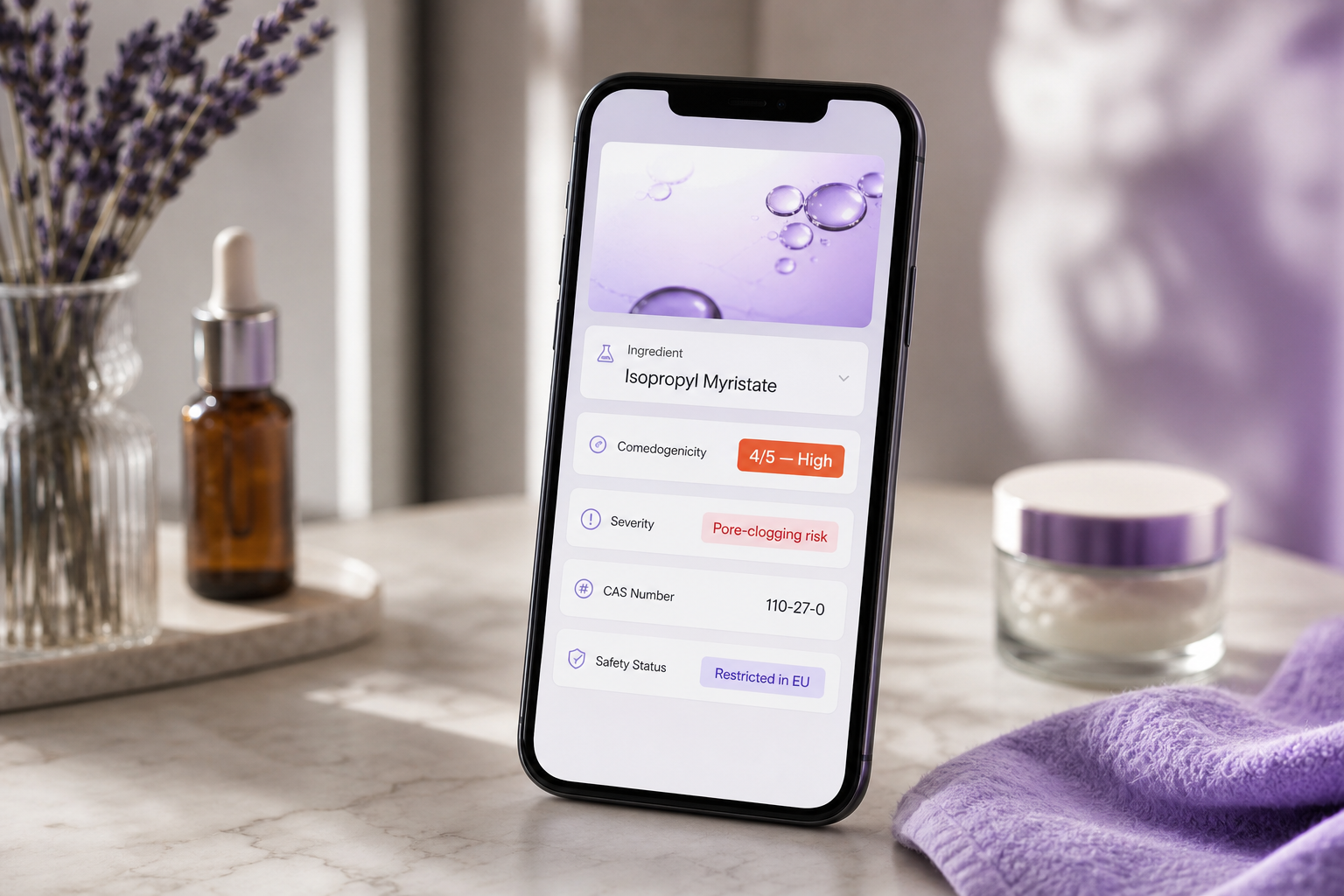
A /v1/analyze response per ingredient includes comedogenicity (0–5), irritancy (0–5), severity (label), safety_status (regulatory rollup across FDA, EU CosIng, and Health Canada), cas_number, ec_number, and synonyms[]. Your job is to compress that structured payload into one glanceable card that doesn't lie about uncertainty.
The 0–5 comedogenicity scale, mapped to UI treatment:
| Score | Plain-Language Label | UI Treatment |
|---|---|---|
| 0 | Non-comedogenic | Green check, no warning |
| 1 | Very low risk | Green, no warning |
| 2 | Low risk | Neutral, optional info icon |
| 3 | Moderate | Yellow caution, expand on tap |
| 4 | High | Orange warning, prominent flag |
| 5 | Highly comedogenic | Red flag, surface immediately |
The scientific caveat belongs in the UI, not buried in a footer. The 0–5 scale originates from the Kligman and Mills rabbit-ear assay developed in the 1970s — peer-reviewed, foundational, and known to overpredict comedogenicity in human skin because it ignores concentration and formulation context. Dermatology researchers including Dr. Rajani Katta and Dr. Whitney Bowe have noted that comedogenicity ratings are useful starting points for acne-prone patients but should not be treated as verdicts. Pair every score of 3 or higher with a tooltip: "Score reflects pure-ingredient testing. Real-world risk depends on concentration and formula."
Why the label on the product means nothing. The US FDA's cosmetics guidance does not formally define or pre-approve "non-comedogenic" claims. Manufacturers self-apply the term. According to Curology's consumer guidance, products marketed as non-comedogenic regularly contain classic pore-clogging ingredients. Your checker's entire value proposition is the gap between the marketing claim and the actual INCI list. Make that explicit in onboarding copy: "We check the actual INCI list, not the front-of-pack label."
Mapping safety_status to user-facing flags. Dermalytics rolls up FDA, EU CosIng, and Health Canada Hotlist data into a single safety_status field with per-region resolution. Build your UI to:
- Show region-specific badges when the user's locale is known: "Permitted in US" versus "Restricted in EU"
- Surface "Prohibited" status from the Health Canada Hotlist or EU Annex II as a hard red flag regardless of comedogenicity
- Differentiate "Restricted" (allowed under concentration limits) from "Prohibited" (banned outright)
- For multi-region e-commerce, show all three jurisdictions side by side: "✓ FDA permitted | ⚠ EU restricted | ✗ Canada prohibited"
Decision rules worth encoding directly:
- If any ingredient has
safety_status: prohibitedin the user's region, surface a red flag first and above all comedogenicity warnings - If three or more ingredients score 3+ on
comedogenicity, attach a formulation-level "high pore-clogging risk" badge - If two or more ingredients score 3+ on
irritancy, attach a "high sensitivity risk" badge - If all ingredients score 2 or below on both axes, render a green "low-risk formulation" badge
Synonym disambiguation. When a user types "Cocoa Butter," the API returns matches under "Theobroma Cacao Seed Butter" with synonyms: ["Cocoa Butter"]. Display the user's term first, with the canonical INCI in smaller type underneath. This preserves trust ("I typed it correctly") while quietly teaching the canonical name over repeated use.
Tooltip framing for nuance. Michelle Wong of Lab Muffin Beauty Science has critiqued simplistic comedogenicity lists, noting that pore-clogging potential depends on concentration, overall formulation, and skin type. Embed that nuance directly in your "Learn more" expansions: "A score of 4 in a wash-off cleanser is lower real-world risk than a score of 4 in a leave-on moisturizer." This is the kind of context that separates a checker users trust from one they dismiss after the first surprising verdict.
The FDA does not regulate the term "non-comedogenic." Your checker's entire value is proving what the label refuses to.
Handling Failed Matches, Proprietary Blends, and Ambiguous Ingredients
The demo path works for 97% of ingredients. The production path has to handle the other 3% without breaking the user's flow. These four patterns cover the failure modes that produce most of the support tickets.
Ambiguous user input ("seaweed extract", "vitamin E oil")
When the API returns no match, or returns multiple candidates through the synonyms[] field, do not show "not found." That phrase reads as a tool failure. Show the top two or three candidate matches as a chip selector: "Did you mean: Tocopherol, Tocopheryl Acetate, or Mixed Tocopherols?" Cache the user's selection against the original string locally, so the next user typing "vitamin E oil" gets an instant canonical mapping without a server round trip. According to Emme Diane's clinical guidance — a vendor source from a licensed esthetician's acne clinic — "not all manufacturers use consistent ingredient naming." Your UI is the layer that absorbs that inconsistency. The API can't read a user's mind; your interface can present the most likely interpretations.
Proprietary blends and trade names ("Matrixyl 3000", "Secret Complex XYZ™")
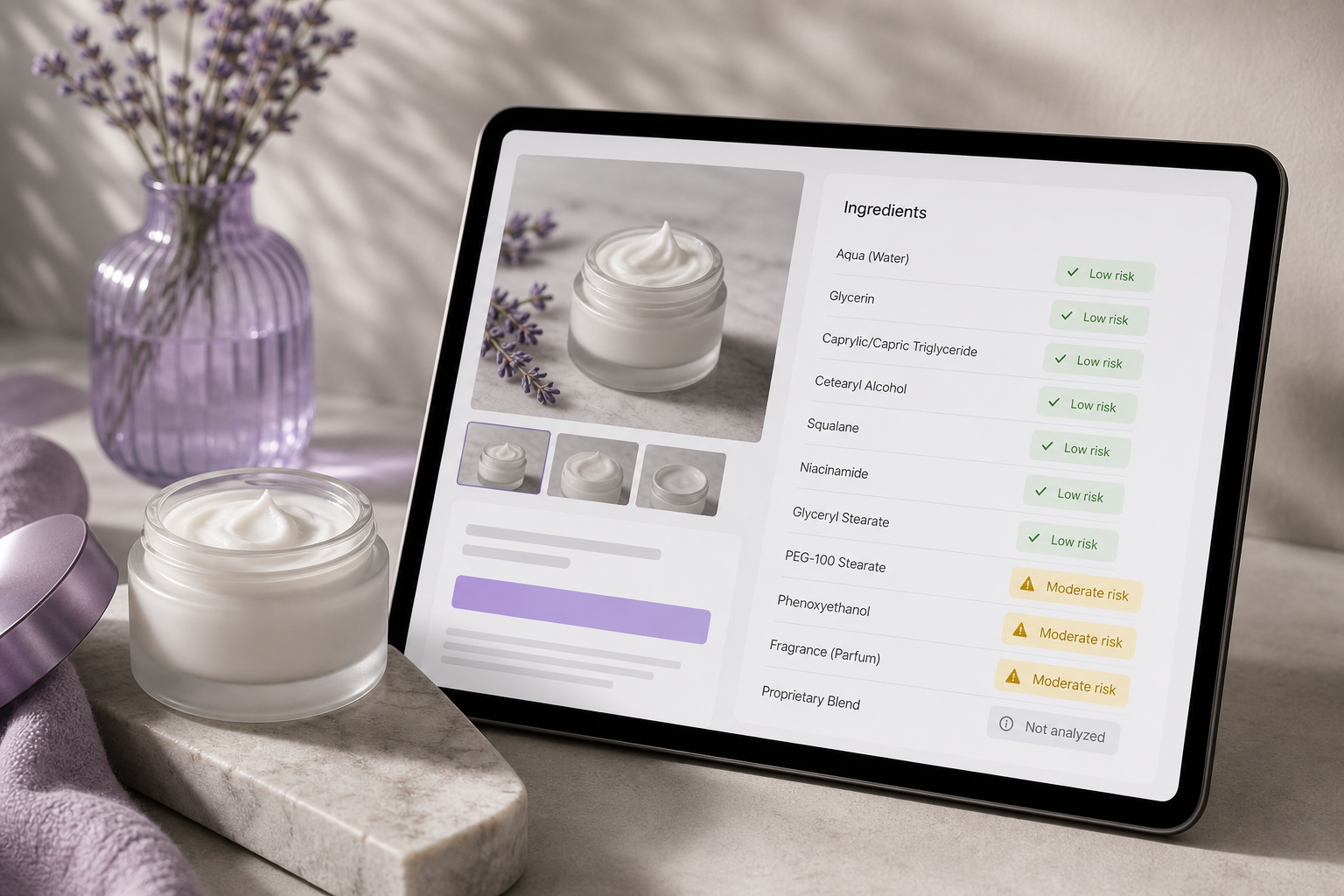
These will never match against INCI databases because they are not INCI names — they are commercial branding wrapped around undisclosed compositions. Detect them client-side via a simple pattern check (trademark symbols, capitalized brand patterns with numbers, "complex" or "blend" suffixes) and surface a distinct UI state: "Proprietary blend — underlying INCI not disclosed by manufacturer." Critically, do not let one proprietary blend block analysis of the other 24 ingredients in the list. Render partial results with a clear "1 ingredient could not be analyzed" notice and a manual override option. Blocking on the unknown is the single most common reason demo checkers fail in production.
Region-specific regulatory conflicts
An ingredient permitted by the FDA may be restricted under EU CosIng or prohibited under the Health Canada Hotlist. The safety_status field includes per-region flags precisely because this conflict is common. If your app serves multiple geographies, accept a region parameter at the user or session level and filter safety_status accordingly. For multi-region e-commerce platforms — where a product page is served to shoppers in three different regulatory zones — show all three flags side by side rather than picking one and hiding the others. Transparency builds more trust than a clean single verdict, especially with users who travel or shop across borders.
High-volume formulations and rate-limit pressure
Some catalogs include ingredient lists with 60–120 entries. The /v1/analyze endpoint handles these, but if you're running a sync job across thousands of products, queue requests client-side. Split any batch exceeding 100 ingredients into chunks of 50. Implement exponential backoff on 429 responses: start at 200ms, double on each retry, cap at 4 seconds. Because credit-based pricing charges per matched ingredient rather than per request, splitting batches incurs zero cost penalty. The constraint is rate limiting, not billing — and rate limiting responds to client-side discipline.
The graceful-degradation pattern in practice. A user uploads a 22-ingredient deck. Two ingredients fail to match — one ambiguous, one proprietary. Your UI:
- Renders 20 ingredient cards with comedogenicity and safety data in ~85ms
- Shows a "2 of 22 ingredients couldn't be analyzed" banner with an expand action
- Lists the two unmatched strings with suggested INCI alternatives where possible
- Offers manual override or skip for each
That is the difference between a checker users trust and one they abandon after the first surprising failure.
The difference between a production checker and a demo is how you handle the 3% of queries that don't match perfectly. Plan for ambiguity, not the happy path.
The Production Audit Checklist for Live Traffic
You can't optimize what you don't measure. This is the checklist to run weekly against a production non comedogenic ingredient checker to catch regressions before users do.
1. Instrument three latency layers separately, never as a single number.
Track client round trip (fetch start to response received), server processing (extractable from response headers when exposed, or measured at your proxy), and client parse plus render (response received to DOM painted). Use the Performance API in browser contexts (performance.mark, performance.measure) and structured logs server-side. Budget targets: ≤40ms server, ≤20ms network in-region, ≤20ms client parse, totaling ≤80ms. When any layer exceeds budget, you know exactly which surface to fix without guessing.
2. Track p50, p95, and p99 latency — never just averages.
The Google SRE Book and industry SRE practice converge on p95 under 200ms and p99 under 300ms for read endpoints under load. Averages hide the worst experiences. If your p99 is 800ms, 1% of your users are watching a sluggish checker — and on a 100,000 MAU app, that's roughly 1,000 unhappy users per day silently churning. Tail latency, not median, predicts complaint volume.
3. Monitor cache hit rate weekly; alert if it drops below 50%.
Steady-state targets: at least 70% for consumer apps, at least 80% for B2B catalog tools where overlapping SKUs are common. A drop below 50% means one of three things — TTL set too short, normalization broken so semantically identical queries hash differently, or user base genuinely too diverse for caching to help. Diagnose by logging the top cache-miss keys and inspecting them for normalization defects (capitalization variants, trailing whitespace, unicode quotation marks pasted from product PDFs).
4. Audit credit consumption against expected formula volume.
Because Dermalytics charges per matched ingredient rather than per request, expected monthly credits roughly equal (formulas analyzed) × (average ingredients per formula) × (1 − cache hit rate). When actual credits exceed expected by more than 20%, investigate three causes in order: an N+1 bug (single GETs inside a loop instead of one batch POST), cache invalidation thrashing, or misbehaving client retry logic firing duplicate analysis requests. The credit dashboard is a leading indicator of architectural drift.
5. A/B test score presentation in the UI.
Test variants: raw "Comedogenicity: 4/5" versus plain-language "High pore-clogging risk" versus both together. Measure time-on-page, conversion (for e-commerce contexts), and support ticket volume mentioning "what does this score mean?" Vendor checkers from AcneClinicNYC and similar acne-focused clinics default to plain-language flags rather than raw numeric scores — there's a reason that pattern dominates consumer-facing tools. Confirm it works for your specific audience rather than assuming.
6. Load-test before launch and quarterly after.
Simulate 100+ concurrent users with realistic INCI payloads of 20–30 ingredients each. Measure tail latency degradation under sustained concurrency. The SDK's connection pooling matters most here — a custom fetch wrapper that opens a fresh HTTPS connection per request will collapse under concurrent load even if it looks fine in single-user testing. Confirm HTTP/2 multiplexing is active. Set production alerts: if p95 exceeds 200ms for five minutes, page the on-call engineer rather than waiting for support tickets to surface the regression.
Audit cadence in practice:
- Weekly: cache hit rate, credit burn versus forecast, p95 latency dashboard review
- Monthly: A/B test analysis, UI tooltip review, regulatory data freshness check (CosIng updates monthly, Health Canada Hotlist quarterly)
- Quarterly: full load test, SDK version upgrade, alias dictionary refresh against the latest INCI updates from the Personal Care Products Council
Ship your checker with these dashboards in place from day one rather than adding them after the first incident. The sub-100ms target is achievable with the underlying API infrastructure; the gaps you'll find in production live in your caching strategy, your normalization layer, and your UI parsing — not in the network round trip. Fix the layers you control, instrument the ones you don't, and the checker will feel instant to the user pasting their twelfth INCI list of the week.